This is a relatively tame update, but the roadmap for the near future is really exciting, with stuff like Simulation Nodes (which already has a usable experimental branch) and Blender Apps (https://code.blender.org/2022/11/blender-apps)
I'm not a programmer so I struggled with the fundamental concepts a bit when learning Geometry Nodes, but it's been the best new addition to my life in a long time. I think I haven't watched any TV show in a year or two because I prefer to spend my time fiddling with GN and answering people's questions about it on Blender Stack Exchange (found out that it's a fantastic way to learn—they're like little prompts leading you to discover areas you hadn't even realized existed). Blender community is so big, creative, enthusiastic, and helpful—you go on Blender-Twitter and it's people making playful/interesting stuff all day and sharing how they did it. I can't stop gushing about it to anyone who'd listen.
As a houdini user the blender nodes make me quite jealous, things like the coupling of the nodes with real time rendering in eevee and basically instant rendering with cycles is something I could only dream of even after spending some good cash on redshift
Do the blender nodes have got an equivalent of vex in houdini? Or variables? Does blender just use raw-ish Python instead?
As I said I'm not a programmer and I'm only familiar with GN so take anything I say with a grain of salt but: Google/YouTube is telling me that VEX is an expression language. We don't have that in GN yet. No scripting of any kind, actually. Everything is done visually, on the nodes themselves, there's no "properties" window for nodes where you do the actual work, everything's sockets and noodles. Shape and color of the sockets tell you the data type (geometry, float, vector...). Scripting support is a common request, but devs usually respond with "it'll come but we need to nail the fundamentals first". It's still a very young system.
There's no Python (like the add-ons), all nodes are C/C++.
I looked into what "variables" are, it says stuff like "position", "current animation frame" etc. Those would be called "input fields" in GN. In addition to default attributes like position, normal, rotation etc you can also capture, store and recall custom attributes, either anonymously or as named ones (always written on geometry in a particular domain--point, edge, face corner etc).
Taking a look at an Entagma video on GN would be much more helpful I'm sure (they also have a course).
I was rather disappointed to learn geometry nodes weren't scriptable. Writing short Python snippets for geometry transformations would have been of great interest. It seems not only do you have to use C++, you have to compile the whole of Blender to add your own nodes!
You can use scripted expressions in drivers, and if the expression is complex it uses the Python interpreter, but drivers are an entirely separate system than GN. They always (afaik) put out a single value, so while you can use them to control a value of a socket or channel inside GN, they wouldn't be evaluated dynamically for every element of a geometry so they wouldn't be a "field".
I'm wondering if this might be the better submission URL. It might be a bit lower on details but at the same time it conveys a richer overview of what the release is about.
The submitted URL is high-on-detail (normally good for HN audience) but low enough on context that I'd say it's mostly of use for frequent Blender users & Blender community members (who likely know how to find both URLs).
The flashy URL, while lower on detail, still packs a reasonable amount in. Alongside much-needed context.
Worth noting (as it's easy to miss) but all the bullet list items at the end of each section of the "flashy" release notes are actually links to related dev details.
Early in the year I made the switch from Modo (by The Foundary) to Blender 3.x, and I've been enjoying it. Since I use 3D software for my video games business it's quite daunting to switch a significant part of your workflow over, because the muscle-memory of all the shortcuts is all there, and you've learnt the Way To Do Things™ in that particular piece of software.
As much as I liked Modo, I was paying a monthly subscription, and now with Blender I don't and it's got this enormous open-source community that provides a lot of long-term confidence, which I wasn't quite getting with Modo. The UI changes going from 2.x to 3.x was pretty important in my decision to switch.
One thing I found helpful when moving 3d modelling softwares was to setup all the keyboard shortcuts to your previous software's bindings, and then you can tackle figuring out the UI, the different object modes and the Blender Way To Do Things™. There's plenty of preference files around on the web that you can plug them in and get going quite quickly
> Early in the year I made the switch from Modo (by The Foundary) to Blender 3.x
Hah, that's me. Except i was out of CG for ~7 years or w/e. I used Modo extensively from 1.0 to .. i want to say 5.0 or something. Tons of modeling. I adored Modo for modeling. This was all before they were bought by Foundary or w/e, though. Back when it was Luxology.
Maybe you have an opinion here.. but how is Blender for modeling? Specifically when 3D Navigating. So far i've found Blender to be .. okay, like it has all or almost all the tools i remember from Modo... but something just feels different. Modo felt so fluid, intuitive. Especially with 3D navigation. Something just doesn't feel as good about 3D Nav compared to Modo. But i can't put my finger on it.
Regardless, Blender has so much power i absolutely adore it. I'm just trying to capture that fluidness that i had in Modo. Yet i can't articulate what it is. Which.. sucks, heh.
I'm really just using Blender for modelling and UV unwrapping (and I've used the paint-to-texture feature once) and I think it's pretty solid, but I really haven't gone near sculpting or anything soft-surface/organic. I probably need to model another dozen things to get up to my Modo ability though.
I also used Modo from version 101 to 501. Maybe it’s because of baby duck syndrome, but I have never found anything that even comes close to Modo, in terms of ease of use and workflow.
You can get the Blender viewport behaviors to match Modo, but you'll need to customize all the Input/Navigation/Keymap settings. The modeling tools themselves are mostly kind of there at a foundational level, but it’s all really clunky in comparison. I wish that Blender had the work plane and tool pipe. I just learned the Blender way to do things, instead of trying to fight it.
I've been getting into Blender for the last few months. Previously i was used to paying ZBrush, Modo and etc 500+ dollars for Licensing, and it's kinda shocking how much functionality you get in Blender for free.
I just signed up for the lowest tier. Not sure how much i want to spare a month, but i can definitely spare a coffee and month and it is well, well worth it. Much thanks to the entire team on Blender, you folks rock :)
I am pretty convinced Blender will be one the most important tools over the next decade. They should teach kids how to use it in middle/high school. Also a great gateway to learn coding with geometry node.
That's great (except probably Stable Diffusion and similar approaches are better than GPT). What about the bazillion other features that Blender has as well? You think AI/ML/magic will replace that too in the future?
A dose of AI would help clean up the interface of every 3D software package, and especially Blender since Blender does everything, and what's really needed is a workflow that lets you start with a prompt like:
"I want to model a realistic humanoid character, using these references"
And then the AI works through the process of setting up the workspace and putting the tools you need front and center.
Right now that setup process is a lot of boilerplate-by-way-of-GUI that gets in the way of using any specific technique.
I'm not sure what level of experience you have with 3D software/animation/creative stuff in general, but that stuff is already there, without having to rely on any AI.
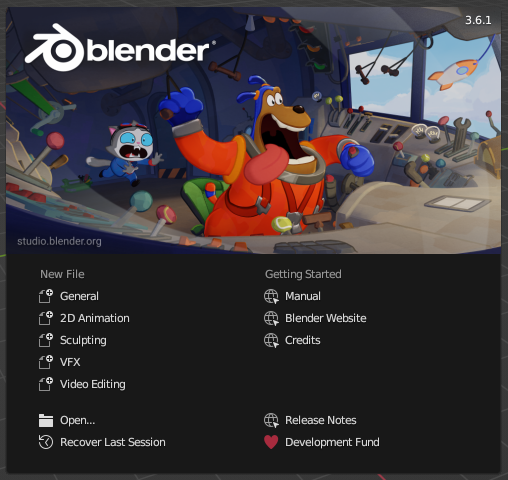
Most 3D packages have something similar, but for Blender specifically, it asks you want area you want to work in when you create a new project, to tailor the UI for that specific task (splash screen screenshot: https://docs.blender.org/manual/en/latest/_images/interface_...). The UI is also highly customizable, basically everything is movable to anywhere, so if you have your own preference (or want to use others from online somewhere), that's trivial to achieve as well.
What you're suggesting doesn't actually contribute anything to speeding up that workflow, as it stands right now.
> Right now that setup process is a lot of boilerplate-by-way-of-GUI that gets in the way of using any specific technique.
What boilerplate are you talking about here? You have specific examples? It sounds to me you're assuming 3D creation is similar to software, somehow. While it's fairly common in the industry to have templates/boilerplate "starters" for various things you want to do.
As an aside, for anyone interested in AI as it relates to Blender, there was a recent Blender Conference talk "Integrating AI tools with Blender" I found thoughtful & informative:
Back in high school, a friend and I wrote a 3D platforming video game from scratch. The on-disk 3D model format we used was something I just came up with. It was plaintext ASCII where we would write in every vertex and tex coord by hand, and the engine would turn those over to the obvious OpenGL functions. That was obviously stupid, so my friend learned how to use Blender and wrote an exporter to my format using its Python API. You can read a bit about it here[1] on our old website, written in 2005 when we were around 17 years old. Memories.
My friend eventually went on to develop & commercially release a 3D platforming game called Poi[2].
Blender’s API is the entire reason I started venturing into the Python ecosystem. Found out I was no good at designing 3D but a lot better at programming.
I love blender, but the Python API is really unpythonic. I really wish you could treat the different things as objects and not by referencing then by their names. Nevertheless, it's pretty cool to automate some things I have to do at work (I am a civil engineer working in research)
Suppose I want to keyframe 200 birds or something, taking off two at at time about every second with a bit of randomness. Oh, I want there to be some variation in their colors. And I just realized I want the interpolation on all of them to be linear, not bezier. That's 50+hours of tedious gui work reduced to 4 hours with the API.
In reality/right now, you'd probably use either a particle system, the boids system or just geometry nodes for something like that though, although for earlier versions of Blender your solution would probably be needed.
Less useful since Geometry Nodes were included, but generative/procedural stuff was only possible via the API for a long time. Besides that, every single addon is leveraging the Python API, so basically any functionality you get from installing an addon.
Besides that, I've written bunch of macros as basically python files I execute in Blender to do repetitive tasks. Another thing I've done is writing a distributed render queue for headless rendering, using the Python API.
I've been using it to automate behavior of an asset pipeline for a game. Basic stuff, like taking many assets and putting them in the right location, combining several things, rendering, on demand (not at runtime, but based on usage in the game), etc.
Neat thing too is it's in Rust, not Python.. because, well, i prefer and know Rust, and by doing it in Rust it works with the rest of my game code so that on-demand stuff i mention plugs in nicely to my existing ecosystem. Note that i'm using Py03 for Rust, so it's just Rust<->Python. Not native Rust support or anything
I've pondered learning it but hadn't gotten around to it. Any particular resource you recommend as a starting point? Because being able to automate certain things myself sounds great, though I'm super rusty on python.
The wiki still claims 3.4 hasn't released, although the download page has been updated. What's weirder is that past releases have had a easy-to-consume release notes[0], but 3.4 doesn't? Maybe posting it here now is jumping the gun a little?
I listened to an interesting interview[1] this week with Blender’s creator (and current foundation chairman) Ton Roosendaal.
He thought that one of Blender’s major challenges was recent developments in the real-time rendering space - notably Unreal Engine.
They’re not direct competitors, of course (and Epic has donated to the foundation) but it does speak to how impressive UE’s render pipeline is.
Again, it’s not a direct comparison, but it’s remarkable what UE5 can do at 60fps on a mid-range Nvidia 30 series card (even without DLSS) versus how long it takes Cycles to render a single frame.
I’ve no doubt Blender will be a future innovator in this space too.
There's an Eevee update in the works that includes some Lumen ideas, real emissive materials for instance (iirc). Even for now, you can dive into the options and enable some stuff like refraction that defaults to off for the folks with less GPU.
I have no idea, I only use blender rarely and almost never render. eevee is intended to be compatible with cycles, I would guess that if your scene does not depend on the advanced lighting that a forward renderer like cycles enables it could replace cycles. I also expect it to be as good, if not better than ue5 as it does not have to hit the framerates that ue5 has to achieve.
Yes, eevee can look great with the right settings. I guess the devil in the detail is what we respectively mean by "great", and "better". Context is crucial: what you're trying to do, where you're doing it and with what constraints, etc.
I guess I would just then reiterate the context of my original comment, which is that the creator of Blender and current foundation chairman is looking at UE's real-time render pipeline and coming away very impressed, even to the extent that he thinks it should influence the future direction of Blender's own real-time pipeline.
yeah. they are wildly different approaches to rendering, with the realtime stuff taking shortcuts in the name of performance, whereas the non-realtime stuff isn't making the same choices. accuracy rules with path tracers like Cycles.
realtime 3D engines have gotten extremely good at approximation, though, and they get better all the time.
around the time they perfect it, hardware will be able to do pathtracing in real time, meaning the shortcut path and the long path to the goal of photorealism were about the same length, just through wildly different terrain.
Any idea on what happened with Apple becoming a sponsor? Apple Silicon compatibility is achieved but I don't see Apple in the sponsor list: https://fund.blender.org
I don’t think Apple were ever listed even though they’re a sponsor (probably due to some desire for branding)
However they’re still contributing to porting it to Metal and improving that support, among other things. You can see various things in progress on the Blender dev pages
It's optional and Apple didn't want to be listed. Their logo has never been displayed on the page. They collaborated with devs from Apple quite closely though, they used to put the meeting notes and updates on devtalk.blender.org
Can very much identify with this! I only just downloaded 3.3.1 the other day. :)
While frequent release cycles are great, keeping up with the changes between Blender, Rust language, Bevy game engine and Godot 4 betas seems like a full time job these days!
It's cool that CAD Sketcher is able to build on the Solvespace solver. I played around a bit with Solvespace in its early days as I liked the constraint-based approach but the... very "specific" :D aesthetic of its UI didn't quite gel with me as much as it clearly does with others. :)
Will watch CAD Sketcher development with interest!
Interesting, I hadn't heard of this before. As a mechanical engineer, it seems like it wouldn't be able to compete with the free (non-open source) CAD platforms - as much as I would absolutely love to see an open source CAD software grow out of something like Blender.
It uses the geometric constraint solver from Solvespace, which is OSS CAD that I contribute too. The same solver has also been integrated into one workbench in FreeCAD. It makes a lot of sense to me that someone wants it directly in Blender for simple parametric designs. Not everything is character animation after all! :-)
give solvespace a try. it is very limited compared to the ones you listed. however I find it enjoyable, fun you may even say, to use. But I have to admit I would have a hard time using it professionally.
I want them to support a textual shading language for all render engines. Instead, they cultivate graphical programming. From a programmer's point of view, this is a significant drawback.
In relation to Blender as Python module, while both docs[1] I've seen mention that you have to build it yourself it does seem this may not actually necessary?
AFAICT it is available as a pre-built wheel via pypi:
I haven't actually tested this but given the wheels are a few hundred megabytes in size, it seems consistent with the possibility. (Guessing the docs might just need to be updated.)
A great way to get started is to write your own addon and get familiar with the Python API. Then as you come across bugs or missing features, you'll have a concrete goal on what you could contribute to, with a anchor to something you're doing "from the outside".
If I remember correctly, Geometry Nodes got started as a Blender addon (called "animation nodes") which eventually the Blender organization went as far as employing the creator of the addon and including it in the main release.
I'm pretty handy with the API, but the C behind it all feels pretty byzantine. I'm newish to OOP and C/C++ so before I can worry about interacting with systems like the window manager, internal database, depsgraph, renderers, RNA/DNA, etc. I gotta understand the paradigms that underpin its organization. Documentation is pretty light (but devs are very helpful in chat!).
I guess Python has just spoiled me. I need a class and "everything is right there". In Blender's C/C++, functionality always seems spread across a variety of files and callbacks in a variety of folders. I tried to follow the main loop through an extremely simple action (select a cube onscreen) to see how the stuff I know happens, happens (draw orange outline, highlight in outliner, update undo history, etc.) I knew it would be a lot, but geez, even one of those things is like a week of reading through code.
I do remember how intimidating Blender was the first time I used it though, vs how easy and natural it is now. I'm looking forward to when it will 'click' enough that I can find my way around even though I don't know how everything works. A 'core workflow' to trace through how stuff happens, if you will.
That's exactly how I've wound up contributing to a couple large open source projects. Try to build somewhat unusual stuff on top of it, find bugs/deficiencies, fix them.
Sort of. It can do much more than sketchup, but the interface is not designed for quick drafting like sketchup is. Blender doesn't shield you from the more complex parts of 3D design like sketchup does, but if you learn it you will have a better grasp of the system as a whole.
I haven’t really used blender, but I doubt it would be a great replacement for most use cases. Fusion360 on the other hand is free and a great replacement!
Blender is an artsy program and development tends to focus on the artsy side. fusion360 is an engineering program and development tends to focus on that use case. Not to say you cant use it for ether purpose. but loosely, blender is better when you only really care about what it looks like and fusion360 is better when you care not how it looks but about the details of the dimensions of your thing.
personally I enjoy modeling in a parametric program like fusion360 more, I guess it appeals to my inner programmer, but nothing I make could reasonably be called "art".
Fusion360 has a big learning curve for me. As a once a year hobbyist, not sure if it's worth the investment to learn. I think you are right that blender is probably worse than Fusion for basic carpentry planning, etc..
Blender imo is a much larger learning curve than fusion. In my experience Fusion or solidworks are about fundamentally how to construct a model. Whereas blender is much more oriented towards someone who may be more technically minded. As well as being just for surface models not real world objects.
I suspect that too. If I learn Blender to replace Fusion/SketchUp, I can do other stuff with Blender. But I'm sticking to basic home DIY. I might just spend some time on Fusion.
Depends on what you're doing with it. I'm an architect who have been using SketchUp professionally for 20 years now, and I use Blender for hobby (Geometry Nodes stuff). For architecture work, Blender absolutely can NOT replace SketchUp, unfortunately (it doesn't even have a universal Section tool, for example), even though it's an incomparably more powerful program in every other area.
Technically, but you need to copy and maintain that modifier for all objects. Even if you did that, usability is non-existent. Just to turn it off for a moment you'd have to select the objects with the right modifier and disable them using an obscure shortcut (holding Alt) and even then it's notoriously slow and finicky anyways--not even in the same universe as SketchUp's section tool.
In terms of ability, sure, Blender can replace SketchUp (and more), but I don't think it'd be worth the learning hassle just for that. The free SketchUp web version should suffice for small DIY stuff. You can always bring your model into Blender for further refining/rendering anyways (there's a good import addon).
I want a low learning curve application for home DIY stuff. I tried Fusion, just a bit more complex that I would like, I supposed Blender is ever more so.
Free web version: https://www.sketchup.com/products/sketchup-for-web There is a list of differences between this and their more professional versions if you scroll down. It doesn't support more advanced stuff (like plugins) but all the fundamentals are there and it is pretty performant.


I'm not a programmer so I struggled with the fundamental concepts a bit when learning Geometry Nodes, but it's been the best new addition to my life in a long time. I think I haven't watched any TV show in a year or two because I prefer to spend my time fiddling with GN and answering people's questions about it on Blender Stack Exchange (found out that it's a fantastic way to learn—they're like little prompts leading you to discover areas you hadn't even realized existed). Blender community is so big, creative, enthusiastic, and helpful—you go on Blender-Twitter and it's people making playful/interesting stuff all day and sharing how they did it. I can't stop gushing about it to anyone who'd listen.